RK Cosmos Live Dealer Games: How to Get Started at Your First Table
What Live Dealer Games Are and How They Work at RK Cosmos
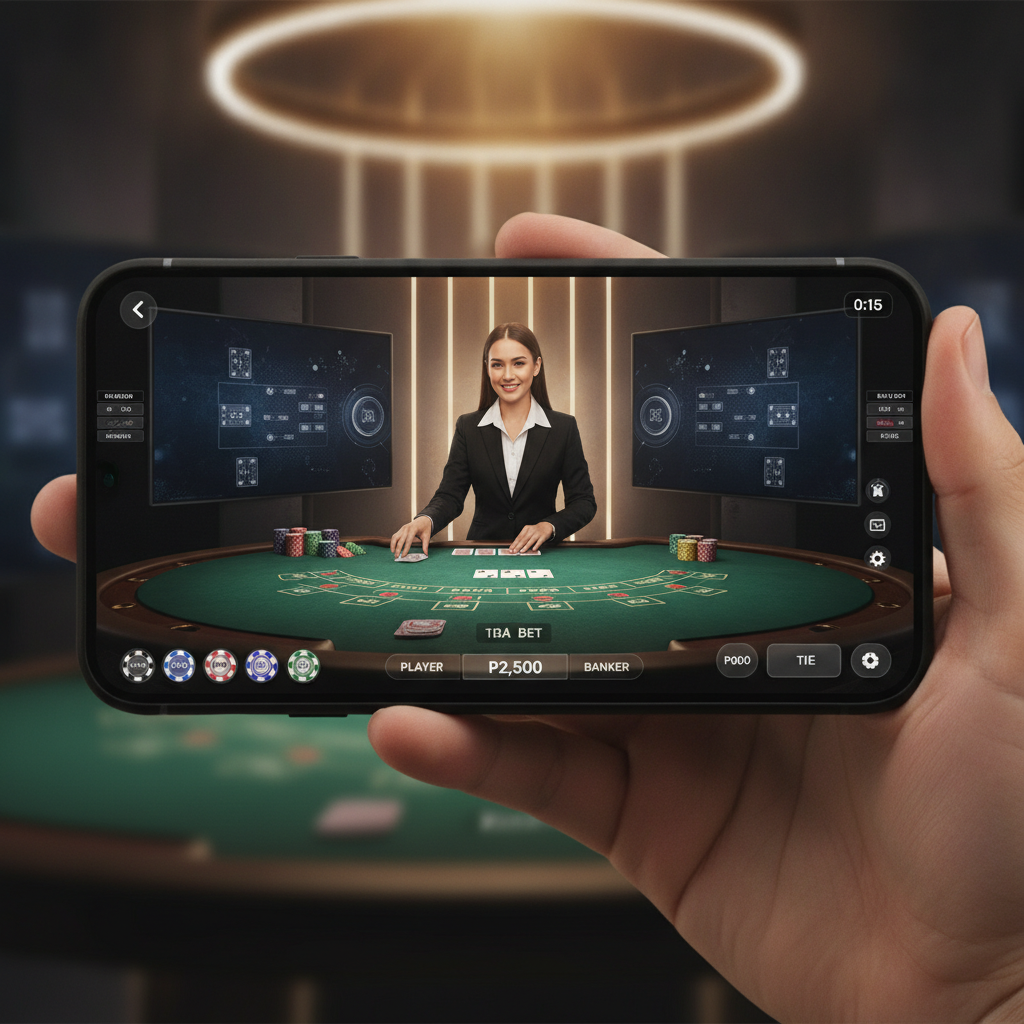
Live dealer games stream real card and roulette tables directly to your phone. Instead of computer-generated results, you watch a human dealer shuffle, deal cards, or spin a wheel in a studio. RK Cosmos offers live dealer games from professional studios that broadcast 24/7, so you can join a table any time of day.
When you place a bet on a live dealer table, you're betting on the outcome of a real shuffle or spin happening in front of a camera. The dealer announces results, and winnings appear in your account balance within seconds. Chat functions let you send messages to the dealer or other players, though this is optional.
Every round follows a timer. You have a set window—usually 15 to 30 seconds—to place or adjust your bet before the dealer announces "no more bets." Once betting closes, the dealer completes the hand or spin, and the software automatically credits winners.
RK Cosmos hosts its live dealer lobby through third-party studio providers. You'll see multiple baccarat, blackjack, and roulette tables listed, each with a different dealer, minimum bet, and sometimes language option. Tagalog-speaking and English-speaking tables are common.
Because live dealer games run on video streams, a stable internet connection is important. Mobile data or Wi-Fi both work, but expect higher data usage than slots. If your connection drops mid-round, the software usually holds your bet and processes the result when you reconnect.
Navigating to Live Dealer Tables and Choosing Baccarat, Blackjack, or Roulette
After you complete your RK Cosmos login, the homepage shows categories for slots, live casino, sports betting, and other game types. Tap the Live Casino or Live Dealer button—the label varies depending on the version of the site.
You'll land in the live dealer lobby. This screen displays thumbnail previews of active tables. Each thumbnail shows:
- The game type (baccarat, blackjack, roulette, or specialty games like Dragon Tiger)
- The dealer's name or table number
- The minimum and maximum bet limits
- How many seats are occupied
Scroll to browse all available tables, or use the filter tabs at the top to narrow by game. Tap Baccarat, Blackjack, or Roulette to see only those tables.
Baccarat is the most popular live dealer game among Filipino players. You bet on whether Player or Banker will have the higher hand, or if the round will tie. Rules are simple, and rounds finish quickly.
Blackjack involves more decision-making. You try to beat the dealer's hand without going over 21. You'll tap buttons to hit, stand, double, or split during your turn.
Roulette lets you bet on numbers, colors, or groups of numbers on a spinning wheel. The dealer drops a ball, and you win if it lands in your chosen zone.
Once you pick a table, tap its thumbnail. The video feed loads, and you'll see the betting interface overlaid on the stream. If the table is full, you may only be able to watch or place "behind" bets on another player's seat, depending on the studio rules.
Minimum Bets for Live Dealer Tables and How to Place Your First Bet
Live dealer minimum bets at RK Cosmos typically start at PHP 50 to PHP 100 per hand or spin. Some VIP or high-roller tables set minimums at PHP 500 or higher. The exact range depends on the studio provider and the table you choose.
Check the table limits before you sit down. The minimum and maximum bet are displayed on the table thumbnail in the lobby and again on the betting interface once you open the game. If you're new, pick a table with a PHP 50 or PHP 100 minimum so you can play multiple rounds without depleting your balance too quickly.
Placing Your First Bet: Step by Step
- Wait for the betting timer to start. After the dealer finishes the previous round and clears the table, a countdown appears on your screen. This is your window to place bets.
- Choose your chip value. At the bottom of the screen, you'll see a row of chips labeled with peso amounts—PHP 10, PHP 50, PHP 100, and so on. Tap the chip that matches the size of bet you want to place.
- Tap the betting area. For baccarat, tap Player, Banker, or Tie. For blackjack, tap your betting circle. For roulette, tap a number, color, or section of the betting grid. Each tap adds one chip to that spot.
- Add or adjust your bet. Tap the same area multiple times to stack chips. If you make a mistake, look for the Undo or Clear Bets button, usually located near the chip selector.
- Confirm and wait. Once the timer runs out, the dealer announces betting is closed. The hand or spin proceeds, and results appear automatically. Winnings credit to your balance right away.
If your balance is too low to meet the table minimum, you'll need to make another deposit through GCash, Maya, or bank transfer before you can continue.
Table Etiquette and Interface Basics for Mobile Users
Live dealer games are designed to feel like a real casino, so a few etiquette norms apply—even though you're playing from your phone.
Chat wisely. Most tables include a chat box. You can greet the dealer or congratulate other players, but avoid spamming, offensive language, or asking the dealer for betting advice. Dealers can mute or report disruptive chat.
Don't delay the game. Place your bets during the timer window. If you're too slow, you'll miss the round. The dealer won't wait for you.
Respect other players' space. If you're at a shared blackjack table, other players are betting on the same shoe. Your decisions—hitting or standing—can affect their hands. There's no "right" way to play, but be aware that some players may react to your moves in chat.
Use the interface buttons. Along the edges of your screen, you'll see buttons for:
- Settings (gear icon): Adjust video quality or sound. Lower quality helps if your connection is slow.
- Chat (speech bubble): Open or close the chat window.
- History or Stats: View recent results for the table. Useful for tracking patterns, though past results don't predict future outcomes.
- Exit or Lobby: Leave the table and return to the live casino menu.
On a small phone screen, the betting grid can feel cramped. Use two fingers to zoom if the platform allows it, or rotate your phone to landscape mode for a wider view. Some tables disable landscape, so try both orientations to see what works.
Audio and video controls. You can mute the dealer's microphone or turn off the video feed if you want to save data. The game still runs, and results update on your screen. However, watching the dealer shuffle and deal adds to the experience and confirms the game is fair.
Connection warnings. If your internet drops, a warning message appears. The round continues without you, and your bet stands if you already placed it. Reconnect as quickly as possible to see the result and place new bets.
21+ Only and Responsible Gambling Reminder
RK Cosmos live dealer games are restricted to players aged 21 and over. You must complete ID verification during the registration process to access real-money tables.
Live dealer games move quickly, and it's easy to place multiple bets in a short time. Set a budget before you start, and stop when you reach it. RK Cosmos is entertainment, not a way to make money. Never bet more than you can afford to lose, and never chase losses by increasing your bets after a losing streak.
If you feel that gambling is becoming a problem, take a break or seek help from a responsible gambling organization in the Philippines.
Ready to try your first live dealer table? Log in to RK Cosmos, navigate to the live casino lobby, and pick a baccarat, blackjack, or roulette table with a minimum bet that fits your budget. Take your time, watch a few rounds if you're nervous, and place your first bet when you're ready.